

Overview
PM Academy utilizes top course material and content to turn your users into experts with special training programs for Autodesk, Revit, ISO, & OSHA just to name a few.
PM Academy‘s online training is complemented with material through its strategic partner Global eTraining (GeT). GeT is an award-winning provider of interactive online training solutions with over 30 years of experience in developing and delivering exceptional computer-based learning.
Online Courses
GeT Everything Library provides access to a large set of online courses in the areas of:
| 69 courses | |
| Microsoft | 7 courses |
| Primavera | 7 courses |
| Total Leadership | 11 courses |
| AEC | 3 courses |
| BIM | 7 courses |
| Global BIM Standards | 10 courses |
| Adobe | 4 courses |
| Bluebeam | 2 courses |
With one annual fee per trainee, each trainee can have access to all the 100+ courses listed in detail below. GeT program comes with
- GeT Interactive – combines text, audio instruction, video demos, hands-on exercises, competency assessments in a user-friendly environment
- Autodesk Plugin – on-demand reference and eTraining tool available directly inside your Autodesk software
- Generator – Build your own courses with custom Learning Paths and Workflow
- Account Management – Monitor, Measure, and Report learner progress and proficiency
- Worldwide Support – Account support, search tools and help desk
GeT Everything Library
The GeT Everything Library includes the following courses:
| Autodesk® | ||
| AutoCAD® 2D Drafting and Annotation | AutoCAD® 3D | AutoCAD® Advanced |
| AutoCAD® Architecture | AutoCAD® Civil 3D | AutoCAD® Civil 3D Advanced Concepts |
| AutoCAD® Electrical | AutoCAD® LT | AutoCAD® Map 3D |
| AutoCAD® Mechanical | AutoCAD® MEP | AutoCAD® P&ID |
| AutoCAD® Plant 3D | AutoCAD® 3ds Max® | AutoCAD® 3ds Max® Design |
| AutoCAD® A360 | AutoCAD® Advance Steel | AutoCAD® BIM 360® Docs |
| AutoCAD® BIM 360® Field | AutoCAD® BIM 360® Glue | AutoCAD® Dynamo |
| AutoCAD® FormIt 360 | AutoCAD® Fusion 360 | AutoCAD® Infraworks 360 |
| AutoCAD® Inventor® | AutoCAD® Inventor® iLogic | AutoCAD® Inventor ® Professional |
| AutoCAD® Inventor ® Routed System | AutoCAD® Maya® Animation | AutoCAD® Maya® Modeling |
| AutoCAD® Moldflow Adviser | AutoCAD® Moldflow Insight | Autodesk® Nastran In-CAD |
| Autodesk® Navisworks® | Autodesk® Navisworks® Manage | Autodesk® Navisworks® Simulate |
| Autodesk® Raster Design | Autodesk® ReCap® | Autodesk® ReCap® Photo |
| Autodesk® ReCap® Pro | Autodesk® Revit® Advanced Concepts | Autodesk® Revit® Architecture |
| Autodesk® Revit® Families | Autodesk® Revit® MEP | Autodesk® Revit® MEP Advanced |
| Autodesk® Revit® Structure | Autodesk® Revit® Structure Advanced | Autodesk® Robot Structural Analysis Professional |
| Autodesk® Showcase | Autodesk® Simulation | Autodesk® Vault Basic |
| Autodesk® Vault Professional | Autodesk® Vault Workgroup | |
| Total Leadership | ||
| Emotional Intelligence | Great Relationships | Presentation Skills |
| Innovation and Problem Solving | Stress Management | Safety Program Implementation |
| Emotional Experience Creation | Attract and Retain the Best People | Communication Skills |
| Time Management | Diversity and Inclusion | |
| Microsoft | ||
| Microsoft Access (2 Levels) | Microsoft Excel (3 Levels) | Microsoft Outlook (2 Levels) |
| Microsoft PowerPoint (2 Levels) | Microsoft Project (2 Levels) | Microsoft Publisher |
| Microsoft Word (3 Levels) | ||
| Primavera | ||
| Introduction to Primavera P6 Professional | Cost Management in Primavera P6 Professional | Essential Activity Codes in Primavera P6 |
| Progress Updating in Primavera P6 | Project Baselines in Primavera P6 | Resource Management in Primavera P6 |
| Scheduling in Primavera P6 | ||
| Adobe | ||
| Acrobat DC | Illustrator | Photoshop |
| InDesign | ||
| BIM | ||
| BIM 101 – Introduction | BIM 102 – Collaborative BIM | BIM 110 – BIM for Architects |
| BIM 120 – BIM for Contractors | BIM 130 – BIM for MEP Engineers | BIM 140 – BIM for the Owner Team |
| BIM 150 – BIM for the Structural Engineers | ||
| Global BIM Standards | ||
| BIM Fundamentals | BIM Acronyms | BIM Roles and Responsibilities |
| BIM & Collaborative Working | BIM Commercials | BIM During an Asset Lifecycle |
| BIM Global Differences | BIM Terminology | BIM Dimensions and Use |
| The Importance of Data | ||
| AEC | ||
| Microstation | Sketchup | Solidworks |
| Bluebeam | |
| Bluebeam Revu Fundamentals | Bluebeam Revu Intermediate |
| McNeel | |
| Grasshopper | Rhino (3 Levels) |
GeT Interactive
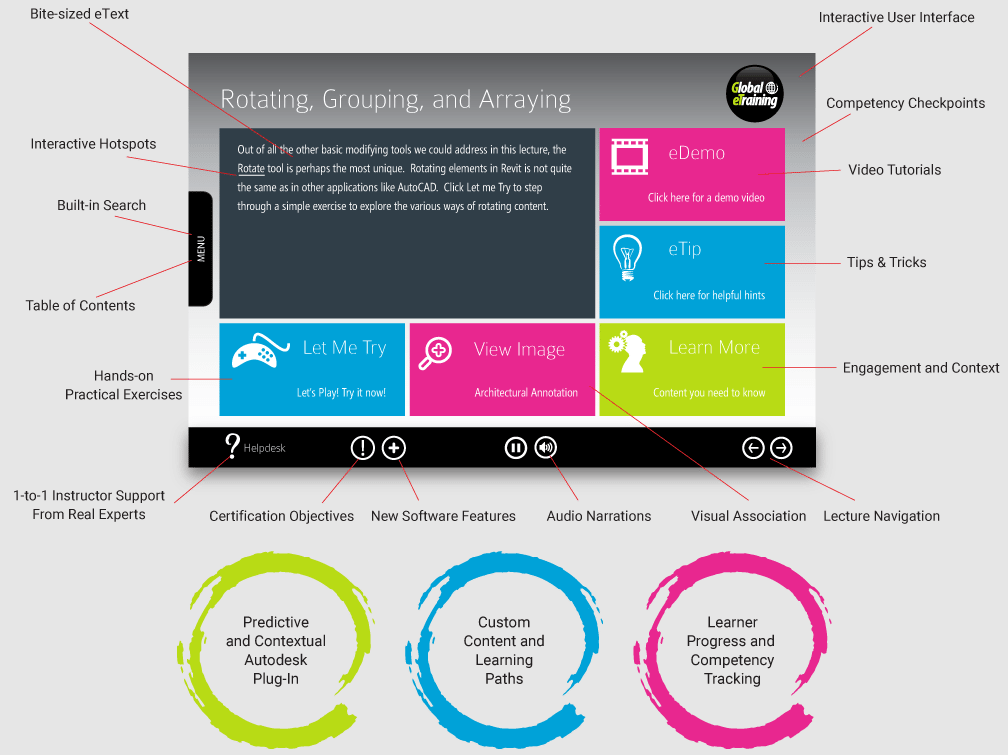
GeT Interactive seamlessly combines text, audio instruction, video demos, hands-on exercises, competency assessments and immediate feedback to replicate the best classroom learning experience. While navigating GeT Interactive, participants can interface with the high-quality and professional content using their preferred styles, supported and enhanced by the built-in complementary styles, leading to a higher level of understanding and knowledge retention.
Autodesk® Plugins
The Global eTraining Autodesk Plug-in provides you answers at your fingertips to solve real problems, in real-time. The plug-in is an on-demand reference and eTraining tool available directly inside your Autodesk software.
Download the plug-in for the following Autodesk products:
- AutoCAD
- AutoCAD Civil 3D
- AutoCAD Plant 3D
- Autodesk Inventor
- Autodesk Revit
- Autodesk Navisworks
The Generator
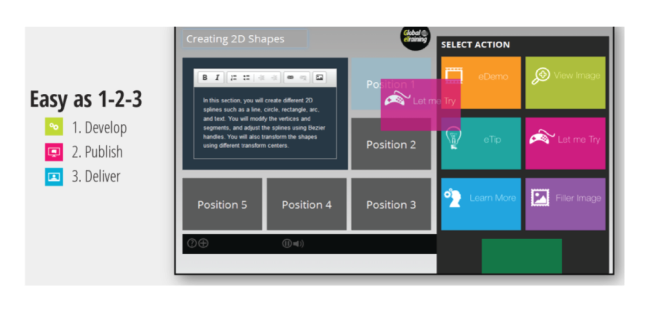
The Generator provides a straightforward knowledge management process to develop effective courses that embrace all learning styles and make best use of your training dollars.
- Build your own courses
- With custom Learning Paths and Workflows
- Integrate training into your BIM strategy
- Capture proprietary workflows, knowledge, and processes
Complete Control
- Integrate Training into your BIM Strategy
- Easily Manage Learners
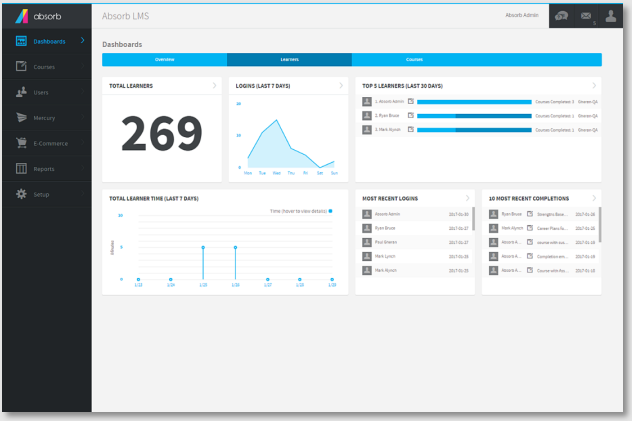
- Monitor, Measure, and Report
- Scheduled check-ins with account team
- Engagement and adoption metrics
- Track learner progress and proficiency
- Strategic data-driven guidance
World Class Support
GeT Everything provides world class support with the following features:
- Dedicated Account Manager: Team up with your dedicated Account Manager to support your eTraining program and drive training adoption.
- Search Tools: Find the resources you need, when you need them with contextual keyword search.
- Help Desk: Real experts and technical support via ticket, chat, phone and screen share.

Reach out to our training experts!
Our team members will respond within 24 hours of your request!